Generative AI (LLM) - Quick Tips on Using Built In Features for ChatGPT/Gemini/Copilot
There are various foundational LLM in the markets such as Gemini, ChatGPT, Claude, Copilot, DeepSeek and etc. However, most users would just be using simply it by typing your questions in the main text box only. Many usually never bother to venture further on many nice features and functions these companies have developed.
These are few nifty functions and techniques that I have explored and learnt from various tutorials videos or user guides that I personally found it useful. You may want to try out.
LLM demonstrated in this post are mainly ChatGPT, Copilot and Gemini.
( Reference: Udemy Course , ChatGPT User Guide , Gemini Help Center , Copilot Tutorial)
1. Personalized ChatGPT Project / Personalized Gemini GEMS
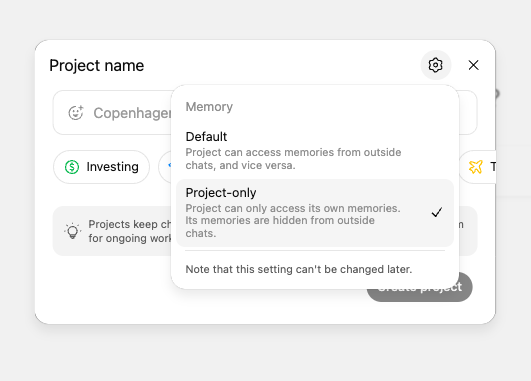
Wherever you want to expound on one specific topics and you would then supplying additional materials by uploading documents to this LLM discussion. It is best to create a specific project inside LLM instead of relying on what LLM perceived he understanding of you. (NOTE: Chattgpt and Gemini would remember previous discussion engaged with them and stored as their memory on you. Usually on key events. Refer to image below on where it is configured in image below) However, the memory feature is non deterministic and you probably do not want them to leverage on this when you want impartial research. This is why you should create a dedicated project in LLM for this purpose instead. ChatGPT project or Gemini GEMS would not mix up project only data with other memory. Making it ideal to store all your documents and discussion in project. Other than this, project/GEMS have larger storage allocation than typical chat windows. You can store more files in project/GEMS. So, you should create new project/GEMS in LLM instead. It is on the left panel of ChatGPT/Gemini.

2. ChatGPT Deep Research / Gemini Deep Research
If you would need to research on certain topics that require citation to back up your research. Instead of using chat window, you should use Deep Research function in Copilot/Gemini/ChatGPT. Referring to the image below, when you are performing deep research, you should start your prompt with "Deep Research" then your topic, the more specific, the better. Then Copilot would take minutes to dig the information for you and each findings would have citation and link like below to back up the points. It is good for scientific research papers that you want to start off with.

3. ChatGPT Canvas / Copilot Page
If you want to prepare a lengthy report or page and seeking help from LLM. You can use ChatGPT canvas or Copilot Page functions to write this report on this dedicated tool instead. ChatGPT / Copilot would open a special panel vertically and that section would be a online word page that you can edit your report there. Copilot/ChatGPT would co-authored the content with you. You can highlight selected paragraph for LLM to rewrite and instruct them to add section. Like image below, you can highlight one line and ask ChatGPT to rewrite or improve.

4. Prompt Structure Break Down and Prompting Framework
I have learnt about this prompt structure from Udemy course and find it very useful. The way how LLM works is that the more specific you explain your prompt, the much better they can assist you in getting your answer. (Source: Udemy Course ) I recommend going through this Udemy course if you want a better understanding on how LLM works and how to optimize your prompt effectiveness. And if want to find out more framework to be used. Other frameworks mentioned in the course in details are
- Prompt chaining
- Chain of thought reasoning
- Tree of thought reasoning
- Ask before answering
- Self critique prompting
- Decision matrix generation
- Reverse prompt engineering
You would not see the prompt that you asked the same way again after knowing these framework and structure.

5. Specialized GPT or Pre-trained Gemini GEMS
Specialized GPT are built in GPT that are pre-trained for specific domain. Referring to listing below, you can use these specalized GPT for specific tasks instead of using the general ChatGPT window. These specialized GPT or Gemini GEMS are pre-trained with many hours on this dedicated topic. It can provide much niche and focused answers to your need. To use specialized GPT, you can go to GPTs at the bottom left of the panel in ChatGPT. The following are top GPTs recommeded by Reddit group.
(Source: Reddit top 50 GPTs )


Comments