Posts

How to transfer app and data from old iPhone to new iPhone for model IOS17 and IOS18 above.

It always a headache for non tech savvy users to transfer their old iPhone app and data to new iPhone.  Despite all the effort by Apple with well thought out UX design to make it as intuitive as possible for users to do it themselves. It is still a hair pulling feat to take on. The worse part is that I notice Apple UX do not like to explain anything in written words, they would expect that you follow the flow of UX intuitvely. Many if not majority of iPhone users would have problem doing this easily perhaps their intuition is not the same as Apple employee most of the time. I checked Apple website on how to do it, there is also no clear instruction how to do it. Their instruction is simply - "trust my program process, i will get you there somehow". There is no transparency in the instruction unless you walk to Apple store in your town and talk to Apple employee to guide you. Comparing to Andoid phone, it seems like Apple are not so keen on helping their user to transfer data...
Key Mapping for iPad Keyboard to Windows Keyboard

The key design and function between Windows and iPad (IOS) are mostly same except for the following commonly used keys in Windows.  I have compiled the most commonly used windows key to iPad mapping for anyone who are using their iPad to type on keyboard.  Key Function Windows Key iPad Key Go back to Home Screen Win + D CMD + H Bring up Search Win + S CMD + space Copy Ctrl + C CMD + C Paste Ctrl + V CMD + V Cut Ctrl + X CMD + X Move cursor to left most Home Control + left arrow Move cursor to right most End Control + right arrow Switch to next other app Alt + Tab CMD + Tab Swich to previous other app Alt + Shift + Tab CMD +   Shift (^) +Tab ...

Microsoft Project - The How To Series that Project Manager too embarrassed to ask. (part 3) - How to define project calendar for my team resources individually for a multi-regional project

Image
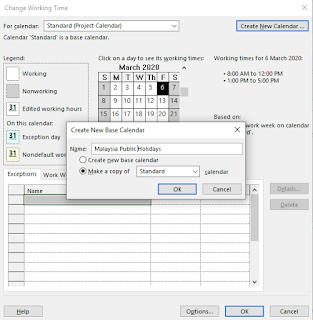
When you are working on project that involves multiple regions, you will run into situation that you want to be define what is  your working days for every single one team member that are coming from various countries. The reason of doing that is each country would have different public holidays and working hours. If you do not cater for this, your project schedule would be inaccurate by missing out the public holidays of each team member from various countries when you estimate your completion date of each task. Of course, you can manually adjust every single team member of the task end date to factor in holidays or theirs. But it is not neat for one, then if you want to make adjustment to your task, your entire schedule would be off. You should only focus on estimating the effort required. The annual leave, public holidays and etc should not be part of your task completion date that you manually adjust yourself. Let the system do the work for you instead. So, Ms Project al...

Samsung Galaxy S series Firmware Update causing installed App won't run and ways to solve it

The Samsung Galaxy S series will be getting firmware update push from Samsung very often. Probably one in few months or more. However, there are always skepticism whether should I upgrade the firmware since the phone is working fine. One fine day, I pressed the Update firmware that has been appearing in the notification panel for very long time. The update progresses well with no major hiccup. I ensure the power supply to my phone maintain so then installation will not stop halfway due to power outage. Installation went well but to my horror, most of the Apps that I transferred to SD card earlier on not able to load. I have restarted my phone but it still won't show up. Google a bit here and there and trial and error. Here are steps to make it work again . 1. Restart the phone few times to ensure it is not because of caching issue. Also, let it run itself by not doing anything with the phone, the phone is doing something in the background even though it is not telli...

Samsung Galaxy S series phone - Screen keeps on waking up itself

I encountered an annoying issue on Samsung Galaxy S series hand phone that the screen wakes up by itself on and off for no good reason.  It drains up my battery really fast. This sort of problem you may engage a hand phone shop to help but not all technical personnel will have time to trial and error to troubleshoot for you. They might suggest something drastic like upgrade your firmware or changing your phone battery and etc. Here are ways for me to resolve it in chronological order. It is not hard really if you have a little time to spare and do some research yourself. I compiled all these together for your easy reference. 1. Check in battery usage in Settings / Smart Manager to see which application use up the most without me notice. (It is best to start here. Make sure the the "stay await" time is not long for any app. If it is, then you might want to uninstall that application. If the stay await comes from Android System, Android OS or Screen. Any system app,...

Connecting Sametime using Pidgin (IBM Sametime 2017, Pidgin 2.12.0) - solving version mismatched error

Image
I get version mismatched error with my Pidgin lately. I tried GTK+ update, Pidgin update, Proxy setting changing and tweaking the setting. Nothing works. Finally, I ran into this article http://crashcarr.com/110/getting-pidgin-configured-to-connect-to-sametime#comment-22231 The key things to make it to work is to add these 2 lines into Pidgin setting. (Prior before this, you should add Sametime account to your Pidgin first, set your Server address and you login and password etc. Then only, the basic settings and Settings tag will be available in your account.xml)   These 2 settings are not available in UI of the Pidgin account configuration.Only one of it is available, the fake_client_id. Also, since it is a XML, make sure all the character used in XML tag are valid ASCII character like your single quote ' and bracket are ASCII. The setting file can be found here - C:\Users\[username]\AppData\Roaming\.purple\accounts.xml Close the Pidgin program, edit the fil...

Tips on how to use IBM iNotes (web client) on emailing or scheduling - Like copy tables from Excel or checking for user id (windows logon id) through email address

There are certain functions that I accustomed with when I write email and schedule a meeting using mail client such as Ms Outlook or IBM Lotus Notes. However, such functions are not straightforward when I am in Lotus iNotes, a completely web based client application. Writing Email Common Functions 1. Checking for user id (Windows Logon ID) for the email address. There is no check for user detail in web based version. In the PC client version, you can do this by right clicking on the email address in the "To" textbox. However, there is another solution in web based verion. You can click on "To" hyperlink to search for that person in the address book. Then, find the person there and click "Details" there to get the user id (Windows Login ID) Similar, if you do not have email address of the person but you have the windows logon ID, you can just type the ID in the "To" textbox and click on search for that person. The system will reverse...

How to reduce the file size of an excel file

I have read a numerous tutorials in the web on techniques to reduce file size. Some of it work okay but not to my satisfactory. I will show those that work first and then I will show my own simple way that works better. Method I found in the web that works but not very well and comes with cons.  - Save your excel file in binary format. Click save as, select Excel Binary Workbook. This however means it will change the format of your file and binary file format is not amendable unless you save as another file format again. Method I found that works better  - Highlight the last row and drag until the very far bottom row of the sheet. Then, select "Delete". The further you go the better. - Highlight the last column and drag until the very far bottom column of the sheet. Then, select "Delete". The further you go the better. Once it is done. Click Save. You should able to reclaim your file size back to small one.

Microsoft Project - The How To Series that Project Manager too embarrassed to ask. (part 2) - Where is the WBS in Microsoft Project?

Image
In the PMBOK project management process groups and knowledge areas. For what ever projects that you are about to embark on planning process group, you will need to create the WBS under project scope management. However, when you think you are already using the industry most commonly used project management software - Ms Project. You simply can't find a way to start working on it using the software. You are like, WTF.... In fact, if you do a bit of Google here and there, you will end up getting search result suggesting you to buy another software that sits on top of Ms Project. The software is not bad but shouldn't WBS a fundamental of project planning? How could Microsoft miss out on this. I am not going to elaborate about the purpose of WBS, what are the details of it and how is it going to be applied. For that, you can refer to PMBOK or any project management web sites for details. What I am going to discuss about is the way to do WBS using Ms Project. And the items th...

Microsoft Project - The How To Series that Project Manager too embarrassed to ask (part 1) - How to print gantt chart and rename resource?

I often times want to do certain things in Microsoft Project that is supposed to be trivial but I always end up I could not find that particular command or function based on my current habit of looking up for things. Even I tried to google for answer but it just returns irrelevant stuff. I suppose these are consider too trivial or too shy for people to ask this sort of questions. So, this article is meant for anyone who shares the same trait like me. Bumping into simple stuff in Microsoft Project that need a quick answer without having to attend formal Microsoft Project training. 1. How to rename the resource in the project? Resource is the usually the team member of the project, it could also be machine or what ever that are required for the tasks to be carried out. The default view of Microsoft Project is Gantt Chart, so, whenever someone wants to rename assigned resource for the task, usually you will just double click on the task and go to "Resources" of the tas...

Making all the sticky notes in Outlook 2010 to appear sticky again

I use sticky notes for one reason is that it will stay sticking on my screen until I have decided to remove it. The Microsoft Outlook the moment you create the sticky note, it will stay on top of the screen. However, when you have switch off your machine or close your Outllook application. The sticky notes will go disappear itself. You have to reopen one by one in the Outlook again to make it sticky on top again. Imagine if you have tons of sticky notes in your notes folder.  Of course for the case of Microsoft Outlook, if you want to quickly check back what you have put into the note is that you can change the view of the Sticky Note folder to list. But then again, that defeat the purpose of me using sticky note. That is not the reason why I use a sticky note, I might as well use task or something else in Outlook for that purpose. So, here goes my solution which is to make use of Office VBA macros. It is not a daunted task as you may think, just a little bit of google se...

Ways to get more system storage for Android phones

There are a lot of ways to clean your storage so then to get more storage for new app installation. If you search in market, you get a array of these kind of apps. Before we talk about cleaning storage. Lets talk about why we need to house keeping sometimes. It is good to have extra system storage, not just for you to install more apps or place personal data. In fact, by having more extra system storage will prevent running into hanging issue for your Android phone. The reason being that some apps will generate temporary files when it performs some tasks in the phone, depending on how good is the developer of the app. If they do not do a proper exception handling in their code, if the phone run into cases that the system storage has run out, the app might cause the entire phone to hang. So, it is important to ensure there are ample amount of system storage available in your Android phone. OK, here goes the real topic of how to get more system storage for your phone. My appr...

Evernote VS OneNote

I was running into situation to pick either OneNote or Evernote for my exam preparation. Version that I am using to compare are - Evernote 5.3 Windows version and  Evernote for Android Mobile. - OneNote 2013 and OneNote2010. I synchronize across few version of OneNote for the same stuff. And then, OneNote for Android recently launched. Experience on the software wise, I have used both OneNote and Evernote for years. Although I have to be frank that, due to heavy duty of notes that I am taking and I am using Windows on my PC. I used OneNote more often. Evernote I came across this because of its popularity in Android community. My feeling towards both of the software are,  features wise, Onenote wins Evernote hands down. Evernote I would say currently it only carries a subset of features what Onenote has. Ranging from tagging, Onenote has ways more in term of doing a tagging like it allows tagging by a selected text in a paragraph. Not just by page. Evernote however ...

Ways to fix your Android (Samsung Galaxy S2) that hangs or becomes unstable

I read numerous posts or discussions in the internet forums or android/Samsung support site about how to fix the android phone problems (software related that could cause hardware to fail) . Most of the solutions coming back are like rooting, reset to factory default settings and etc. I am not sure about others but to me, the stuff most important in a phone are below.  - Settings I have spent time putting into the phone itself, not just apps(that includes icons in the home screen, folder that stores apps, short cuts/customization that fit my style of using the phone and etc) - Apps that I have already installed and comes with my data in it.  Apps that i have spent time configuring, store personal stuff in it. Not to mention those I have spent $$ on it.   (If you have purchased the app from Google Play, chances are you get to re-download the app for free but if you purchased it from else where, then, good luck to you. ) - Phone data (like contacts, calendar, notes,...

Duplicating a local copy of project from TFS and making web software client factory to work

My team members were asking me about how come their files can't be modified and etc even if it is a duplicated local copy. I tried it out and realized it is indeed not working as told. My finding was that the TFS has a tight control on the versioning of the file, even if the files are offline or those files are duplicate copies of the original files, the TFS control still present in every aspects of the actions you want to do onto those files. So, it seems like there need to have an official declaration to inform Visual Studio that the project files are out of the TFS radar. After some internet searches and trials, it seems like to "permanently" detach project file from TFS are not so straightforward and not properly documented too. It requires some kind of hacking seems. Below are the steps required after the files get copied out from the TFS. 1. Change all the files from readonly to non-readonly. 2. Remove your local workspace from the Visual Studio. Go to me...

Spam Messages and Messenger Software in Mobile Devices. And How to Remove the Spammer

Many people are using their mobile devices to communicate nowadays. Messenger, facebook, SMS and etc in one device. And to serve the users needs, most mobile devices will come equip with multi-protocol messenger built in or free to download and install. However, because these free multi-procotol messenger software are not the de facto owner of these messenging protocol like GTalk or MSN messenger. They lack of proper update in term of protocol support and vulnerability fixe that big corp like Microsoft can offer. Because of that, spammer and malware are taking advantages of this and exploiting these loopholes. Thus, many mobile devices user are getting scam, junk messages from their mobile devices messengers. Recently, i have just removed a long time MSN messenger spam+bot contact of mine that has Artifical Inteligent that can prevent typical messenger contact removal from mobile phone. Logon to latest version of PC Microsoft Windows Live. Then click - Tools - Options - Privacy - Bl...

Disable Nokia On Screen Keypad for the applications by editing JAR (j2ME) manifest file without having to repacking or make use of programming tools

I have a phone that runs on Symbian S60v5. The phone is a cool phone as I can use it for GPS navigation, decent camera, ergonomic (no awkward function/design like some other phones i have used before that put me off. Design and function make sense to me, no impractical but just down to earth.), sturdy , stable signal reception and good call quality. However, like any phone OSes, there are always bugs in it and Symbian makes no exception. And of all bugs in Symbian S60v5, there is one particular bug in the Symbian that really annoys me. It is this Java Suite Setting that sits inside the Installed App menu (Symbian Application Manager). The Installed Applications has a memory constraint bug that it cannot load up if there are too many applications/games installed into your phone. Especially if you have upgraded your memory card. When the Installed App could not load up. There is no way that you can change the Java Suite Settings of your Java application/game. What is in the Java Suite...